Page 01, Why color matters, gave the numbers: low-contrast text is the most commonly detected accessibility failure on the web, found on 83.9 percent of the top million home pages in 2026. It also introduced the three WCAG success criteria about color and the habit of redundancy. Page 02 explained relative luminance, the quantity contrast is built on. This page is the full treatment: the thresholds and how to measure them, what the formula misses, and how a page survives when the reader's eyes or settings change every color on it. Three demos let you measure, see and break things, and the Terra Outfitters stores supply the failures.
1. Three rules
Every section below comes back to one of these:
- Enough contrast. Text needs at least 4.5:1 against its background, large text and the parts of controls and graphics at least 3:1. These are WCAG 2.2's level AA numbers, the level that laws, contracts and audits usually ask for.
- Never color alone. Anything color says, a word, an icon, a shape, a pattern or a position also says.
- The reader's settings win. Forced colors, a contrast preference, a user style sheet, grayscale or a browser's color override may replace your palette. A page built from real structure keeps working when they do.
The rules are not a style. They leave room for any palette, as the store's fixed Trail report shows: it keeps its orange brand, its lake photo and its two-color chart, and passes all three. What they rule out is a page whose meaning depends on the reader seeing the colors exactly as the designer did, which no page can promise.
2. Contrast, measured
WCAG 2's contrast ratio compares the relative luminance of two colors, how much light each sends to the eye, as (L1 + 0.05) / (L2 + 0.05), with the lighter color on top. The result runs from 1:1, two identical colors, to 21:1, black on white. Page 02 shows the arithmetic. Three success criteria use the ratio:
| Criterion | Level | Normal text | Large text | Controls and graphics |
|---|---|---|---|---|
| 1.4.3 Contrast (Minimum) | AA | 4.5:1 | 3:1 | n/a |
| 1.4.6 Contrast (Enhanced) | AAA | 7:1 | 4.5:1 | n/a |
| 1.4.11 Non-text Contrast | AA | n/a | n/a | 3:1 against adjacent colors |
The details matter when a pair sits near a line:
- Large text is at least 18 point, or 14 point bold. The Understanding document converts those to about 24 and 18.5 CSS pixels; many tools say 18.66, which is 14 times 4/3. Below that, use the normal-text number. Type for people explains why thin and light fonts need more than the minimum.
- No rounding. WCAG's Understanding document says computed ratios "should not be rounded (e.g., 4.499:1 would not meet the 4.5:1 threshold)". Tools that print one decimal can show 4.5 for a pair that fails.
- Exempt: logotypes, purely decorative text, text in pictures that is incidental, and inactive components such as disabled buttons. Exempt is not a recommendation: a disabled button nobody can read leaves people wondering what they cannot do.
- 1.4.11 asks about what identifies a control. A text field's border, a checkbox's box, a slider's thumb, a chart's lines and an icon that is the only label all need 3:1 against what is next to them. A control does not need a boundary at all if its text or icon already shows it is there; the Understanding document says a visible hit area "is only required when there is no other visual way to identify the presence of the control". States count too: a checked box must look checked at 3:1.
The broken stores supply examples. The inaccessible store's SIN #7a sets body text in #9a9a9a on a #f6f4ee page: 2.56:1, which fails even the large-text minimum. The discolored Trail report's custom checkboxes (SIN #6) are light gray squares on a white panel, 1.28:1, so unchecked boxes are close to invisible to many readers before forced colors ever arrive.
Translucent colors are measured as painted
A text color of oklch(0% 0 0 / 50%) is a different gray on every background, so its contrast cannot be read off the token. Measure what is painted: blend the color over what is behind it, then compute the ratio of the result. The section's shared helper does exactly that and refuses to do anything else: its contrastRatio() returns null for a translucent color, and composite() must lay it over an opaque background first. The same rule applies to a translucent background, which is a different color over every pixel of what lies beneath. WCAG 3's draft says the same thing in a note: transparency "should be tested as the rendered color".
Every pair states its contrast
The contrast check is arithmetic, so it belongs in a test, not only in a designer's checklist. That is this section's second house rule, and it is how this site checks its own theme. test/theme-contrast.test.js reads the oklch() values straight out of powell-theme.css, converts each to sRGB with scripts/color/oklch.mjs, and asserts the ratios the theme depends on:
The test runs with every other test, so a designer who lightens a navy or a developer who swaps a token finds out from a failing build, not from a reader. Two habits make this work for any project. Compute from the values the browser uses, not from a hex value in a comment that can go stale. And test pairs, not colors: a color has no contrast, only a text color on a particular background does, so the test names the roles that meet (--color-accent-text on the code background) rather than checking a swatch alone. Page 03, Color in CSS, tells how the theme was converted.
3. What the formula misses, and APCA
WCAG 2's formula is simple, well tested and legally entrenched, and it has known gaps:
- It ignores polarity. Swap text and background and the ratio is identical, but dark text on a light page and light text on a dark page are not equally easy to read, which matters for dark themes.
- It ignores weight and size beyond the two bins of normal and large. A 300-weight face at 14 pixels and a 700-weight face at 20 pixels get the same verdict for the same colors.
- It misjudges mid-tones and light-on-dark pairs. On the store's orange, white text measures 5.13:1 and black 4.10:1, so the formula prefers white; on a mid blue such as
oklch(60% 0.15 250)it prefers black, at 5.4:1 against white's 3.9:1, although many readers find white easier there. Page 04's section oncontrast-color()works through that case. - It knows nothing about surroundings: the size of the area, the light around the screen, or the thin anti-aliased edges of small text.
The Accessible Perceptual Contrast Algorithm, APCA, by Andrew Somers, models these. It treats the two polarities differently, reports a lightness contrast value (Lc) rather than a ratio, and ties its thresholds to font size and weight through lookup tables. Early drafts of WCAG 3 used it. It was removed from the working draft published on 24 July 2023, under the working group's rule that exploratory content without group support is dropped after six months. The current Working Draft, dated 10 September 2026, keeps a placeholder for text contrast and an editor's note: "The contrast algorithm used in WCAG 3 is yet to be determined." Adrian Roselli's April 2026 summary of the history says that nobody can yet say whether APCA, in any version, will return.
So the practice is plain. Meet WCAG 2.2's numbers, because they are what audits and laws measure. Use APCA, or simply your eyes on a real screen in a bright room, as a second opinion, especially for dark themes, thin fonts and mid-tone backgrounds. Where the two disagree, a pair that satisfies both is usually available a few steps of lightness away.
4. Text over images
Text on a photograph has no single background, so a single ratio means nothing. WCAG measures contrast against "the specified background over which the text is rendered", and for a photo that is every pixel behind the letters. Check the worst pixel, not the average, because the reader's eye stops at the letter that disappears.
The discolored Trail report's SIN #7 sets a white headline straight on a photo of a mountain lake. Measured pixel by pixel across the top-left region where the words sit, white against that pale evening sky ranges from 1.74:1 to 2.85:1, with a median of 2.45:1. Every pixel fails 3:1, the large-text minimum. It looked fine in the mockup, which the source comment says used a darker stock photo; this is how text over images usually fails, when content changes and the style sheet does not.
The fixed page's COLOR FIX #7 puts the words on a band, --scrim: oklch(22% 0.03 150 / 0.85). The band is translucent, so the rule above applies: measure it as painted. Over the worst possible pixel, pure white, it paints as #344136, and white text on that measures 10.74:1. Any darker pixel only makes the band darker, so 10.74:1 is a floor for the whole photo. The techniques, in order of reliability:
- A solid or nearly solid band behind the text, as the store uses. It works on any image and is easy to verify.
- A gradient scrim over the part of the image where the text sits. Check the ratio at the gradient's weakest point under the text.
- Choose and crop the image so the text sits on a calm, dark or light area, and recheck whenever the image changes. That is the fragile one.
A text-shadow halo helps on screen, but forced colors remove text shadows entirely, so it cannot be the only defense. Forced colors bring their own help instead: the browser may paint a solid backplate behind text, which is why the hero text in the screenshots of section 12 stays readable. Text baked into an image is a different problem, covered in Type for people.
5. Never color alone
Success criterion 1.4.1, Use of Color, is level A, the floor: "Color is not used as the only visual means of conveying information, indicating an action, prompting a response, or distinguishing a visual element." Page 01 built the habit of redundancy with the inaccessible store's stock dot (SIN #8). The discolored Trail report breaks the rule three more ways, each fixed on the www copy:
- Links by color alone (
SIN #9). The link green,#2f6b3f, is 5.79:1 against the page, readable, but only 2.34:1 against the body text around it, with no underline. The criterion's sufficient technique G183, "Using a contrast ratio of at least 3:1 to distinguish inline text links from surrounding text", sets that 3:1 as the bar this green misses; the simpler answer is the underline, whichCOLOR FIX #9restores. Page 02 shows that even the default link blue reaches only 2.2:1 against black text: the convention always relied on the underline. Links people can use covers when an underline can go. - Errors only by a red border (
SIN #8). Submit the form empty and two fields turn red, with no word anywhere about what is wrong. A reader who cannot tell red from gray sees nothing; a screen reader hears nothing; forced colors replace the red.COLOR FIX #8writes "Error: enter an email address, like name@example.com." next to the field, after a warning icon, tied to it witharia-describedby, in a red that reaches 6.63:1, and thickens the border as the third cue. Forms people can use covers the messages themselves. - A chart told apart by red and green (
SIN #5). Two lines with the same width and the same round markers, named only by a legend of colored squares.COLOR FIX #5labels each line at its end, dashes one, and gives each its own marker shape. Page 05's palettes for data chooses the colors; this rule says the colors must not be the only difference.
Required fields follow the same rule: a red asterisk is a color cue and a symbol, and the symbol needs a key or, better, the word "required". Status colors, selected states and current-page markers all need a second carrier, which page 05 covers under status colors. The quick test is the one page 01 suggested: look at the page in grayscale. The next section explains why grayscale is a fair stand-in for some readers and only an approximation for most.
6. Color vision deficiency
Human color vision rests on three kinds of cone cell, most sensitive to long, medium and short wavelengths, loosely called red, green and blue. A color vision deficiency is a change in one of them. About 1 in 12 men and 1 in 200 women have one, according to the UK charity Colour Blind Awareness; most inherit it, and the genes for the red-green types sit on the X chromosome, which is why men are affected far more often. In a lecture hall of a hundred men and a hundred women, expect eight or nine.
| Type | Cone affected | Colors confused | How common |
|---|---|---|---|
| Protan (protanomaly, protanopia) | Long, "red" | Red with green, brown and dark gray; reds look darker | About 2 percent of men |
| Deutan (deuteranomaly, deuteranopia) | Medium, "green" | Red with green, brown and orange | About 6 percent of men; deuteranomaly alone about 5 |
| Tritan (tritanomaly, tritanopia) | Short, "blue" | Blue with green, yellow with pink or gray | Very rare |
| Achromatopsia | No working cones, or only one type | All hues; only lightness remains | About 1 person in 33,000 |
The "-anomaly" forms shift a cone's sensitivity; the "-opia" forms, in which a cone type is missing, are less common overall, mostly because deuteranomaly alone accounts for about 5 percent of men, while protanomaly and protanopia are about 1 percent each. So most affected readers see some difference between red and green, just much less of it, and it shrinks further in dim light, on a small mark, or when the two colors also have similar lightness. That last factor is the one a designer controls. In the diagram, the broken store's red and green chart lines become two olive tones only 1.15:1 apart in luminance under a deutan simulation; the fixed store's rain and sun lines stay apart in hue for red-green readers, and in every view they also differ in dash and marker.
The up and down price colors are the instructive case. As designed they are a strong green and a strong red, and they differ in luminance by almost nothing, 1.01:1. That is fine on the fixed page, because the arrow and the word "up" or "down" carry the meaning and the color only reinforces it. It would be a failure anywhere the color stood alone. Two habits follow from the diagram. When two colors must be told apart, separate them in lightness as well as hue, and when the difference matters, add a shape, a pattern or a word that needs no color at all.
Simulate instead of guessing. Chrome and Edge DevTools have "Emulate vision deficiencies" in the Rendering panel, with protanopia, deuteranopia, tritanopia and achromatopsia (plus blurred vision and reduced contrast), and Firefox's Accessibility inspector has a Simulate menu. macOS users can try Sim Daltonism. All of them use matrices like the ones in the diagram, so all of them are approximations: real color vision varies from person to person, and a simulation of the complete "-opia" forms exaggerates what most affected readers see.
7. Low vision and age
WCAG's numbers come from vision science, not taste. The Understanding document for 1.4.3 starts from 3:1, the minimum that ISO and ANSI standards recommend for readers with normal vision, then multiplies by the loss of contrast sensitivity that comes with reduced acuity. Visual acuity of 20/40 goes with a loss of about 1.5, and "a user with 20/40 would thus require a contrast ratio of 3 * 1.5 = 4.5 to 1". The same reasoning for 20/80 gives about 7:1, the AAA number. And the document notes that 20/40 is "commonly reported as typical visual acuity of elders at roughly age 80".
So 4.5:1 is not a generous margin. It is the minimum for an ordinary older reader, before the room and the screen take their share. Several changes come with age: the lens yellows and scatters more light, so blues darken and glare grows; the pupil shrinks, so less light arrives; and contrast sensitivity falls, so low-contrast gray text fades first. Add a phone in sunlight or a washed-out lecture projector, which page 07, Displays and environments, measures, and a pair at 4.6:1 is the first to go.
Three habits follow:
- Treat the minimum as a floor. Body text well above 4.5:1, around 7:1 where the design allows, costs little and helps many. The fixed Trail report's body text is 13.55:1.
- Watch the quiet colors. Placeholder text, captions, disabled-looking hints, footers and "muted" secondary text are where most failures live, because they were designed to recede.
- Survive zoom and enlarged text. Low-vision readers magnify. Contrast that relies on a hairline border, or text that only fits at the designed size, fails them twice. CSS for people covers zoom and reflow.
8. Forced colors
In a forced colors mode the operating system or browser replaces the page's colors with a small palette the reader chose. On Windows 11 it is a contrast theme (Settings › Accessibility › Contrast themes, with themes named Aquatic, Desert, Dusk and Night sky, or Left Alt + Left Shift + Print Screen). Firefox can do the same on any platform when its color settings override the page's colors. macOS and iOS have no forced colors mode; their Increase contrast setting is a preference, the subject of the next section. Readers use forced colors for low vision, for light sensitivity and migraine, and for reading comfort. The CSS Color Adjustment specification (a Candidate Recommendation, December 2025) defines what happens:
- Colors are forced.
color,background-color,border-color,outline-color,text-decoration-color,column-rule-colorand others take system colors from the reader's palette. The specification lists SVGfillandstroketoo, but it also gives every<svg>forced-color-adjust: preserve-parent-color, so in practice SVG colors are kept; see below. The alpha of a background is kept, so a transparent background stays transparent. - Decoration goes.
box-shadowandtext-shadowcompute tonone, andbackground-imagecomputes tononeunless it is aurl()image, so gradients vanish and photos stay. - The browser may help. It may paint a backplate behind text,
color-schemebecomeslight dark, andaccent-colorandscrollbar-colorbecomeauto.
Chrome 156 shows all of this when you emulate forced colors: an element with a red box-shadow, a text-shadow and a linear-gradient() background reports none for all three, a half-transparent background becomes half-transparent white, and an outline declared transparent computes to black, the palette's text color. What it does not force is SVG, and the specification says it should not: its default style sheet gives inline <svg> forced-color-adjust: preserve-parent-color, and Chrome follows it, so a red <rect> stays red under forced colors whether its fill comes from a fill attribute, a class or a style attribute, possibly on a background now black. Only fill: currentColor, inheriting the forced text color from the HTML around the SVG, follows the reader's palette. So draw icons and marks with currentColor, as page 03 recommended under currentColor, or set system colors for them in a forced-colors rule, as the fixed store does for its chart.
The system colors
Under forced colors the palette is exposed to CSS as system colors, the same keywords page 03 introduced. They come in pairs meant to be used together:
| Background | Foreground | For |
|---|---|---|
Canvas | CanvasText | The page and its text |
Canvas | LinkText, VisitedText, ActiveText | Links |
ButtonFace | ButtonText, with ButtonBorder | Buttons |
Field | FieldText | Text inputs |
Highlight | HighlightText | Selected text and selected items |
SelectedItem | SelectedItemText | Selected items in lists and menus |
Mark | MarkText | Highlighted passages |
Canvas | GrayText | Disabled text |
Use a pair, never half of one. Highlight text on Canvas may have any contrast at all, while HighlightText on Highlight is the pair the reader's theme guarantees.
What disappears, and the fixes
Anything drawn only with a background color disappears, because every background becomes the same Canvas or ButtonFace. That is the discolored Trail report's SIN #6: checkboxes made with appearance: none and a background that turns from gray to orange, with no border and no check mark. Under forced colors the boxes, checked or not, are gone, the "Sign up" button loses its edge, and the red error borders of SIN #8 become the same color as every other border.
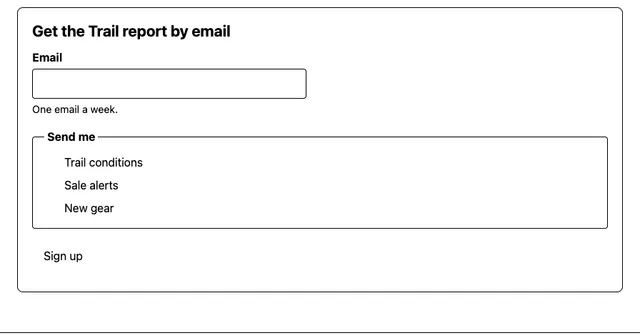
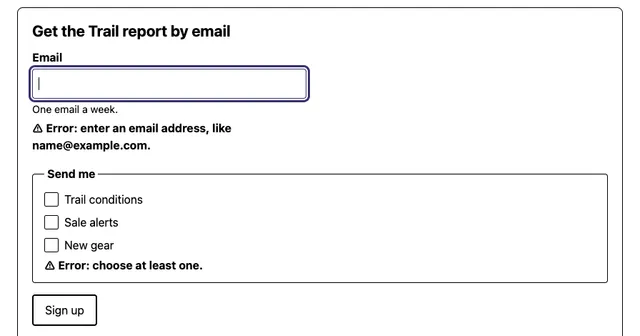
The fixes are few and small, and most of them are good practice anyway:
- Real controls.
COLOR FIX #6uses native checkboxes tinted withaccent-color. The browser draws the box and the check, so they survive forced colors, zoom and every theme. - Borders and outlines, even invisible ones. A button with
border: 0.125rem solid transparentlooks borderless on screen; under forced colors the border takes the button text color and the button has an edge again. The same trick works for focus: an outline survives where abox-shadowring is removed. currentColorfor icons and marks, so they follow the forced text color.- A small
@media (forced-colors: active)patch for what remains, using system color pairs. Keep it small: the reader chose their palette, and the patch exists to restore structure, not to restore your brand. forced-color-adjust: noneonly where the color is the content, such as a color picker's swatches or a product's color options, and then with a text label, because the reader may not be able to see the swatch.
Support is broad. The forced-colors media feature works in Chrome and Edge, Firefox and Safari, and has been Baseline widely available since March 2025; Safari parses it, but since Apple's systems have no forced colors mode it never matches there. forced-color-adjust works in Chromium browsers and in Firefox from 113, but not in Safari. The older, Microsoft-only -ms-high-contrast media query worked in Internet Explorer and in Edge until version 138, in 2025; use the standard one.
9. prefers-contrast and other preferences
Forced colors replace the palette. A preference only asks, and leaves the answer to the page. The prefers-contrast media feature has four values: no-preference; more, which on macOS and iOS follows the Increase contrast setting; less, for readers who find strong contrast uncomfortable; and custom, meant to match a forced-colors palette that is neither clearly more nor clearly less contrasty. It has been Baseline widely available since November 2024 (Chrome 96, Firefox 101, Safari 14.1).
Answer more by strengthening what is already there, through tokens: darker muted text, solid borders where there were faint ones, thicker focus rings and underlines, and no text over images. Answer less by softening the extremes, such as pure black on pure white. Neither replaces meeting the minimum, because most readers who need contrast never set the preference, and some cannot.
Do not assume the values combine predictably. In Firefox 150, the build Playwright drives, tested on 27 October 2026 with its color override turned on, forced-colors: active matched and none of more, less or custom did. Write each response so it stands on its own.
prefers-reduced-transparency: reduce reports the system setting that turns translucent panels and frosted-glass effects opaque, often used by readers for whom a busy background behind text makes it hard to read. It ships only in Chromium browsers, from version 118; Firefox has it behind a flag and Safari does not have it, so it is not Baseline. Treat it as a refinement: make translucent surfaces readable without it, then make them solid when it matches.
Responsive design introduced these features beside prefers-color-scheme and prefers-reduced-motion; page 06, Light and dark, covers the color scheme in full.
10. Focus you can see
For a keyboard user the focus indicator is the cursor. Three WCAG 2.2 criteria govern it:
- 2.4.7 Focus Visible (AA): some indicator is visible. Removing the browser's ring with nothing in its place fails it, which is the inaccessible store's
SIN #4a, the single rule*:focus { outline: none; }. - 2.4.11 Focus Not Obscured (Minimum) (AA), new in 2.2: the focused element is not entirely hidden by content the author added, such as a sticky header or a cookie banner. Links people can use shows the
scroll-paddingfix. - 2.4.13 Focus Appearance (AAA), also new: when the indicator is visible, an area of it "is at least as large as the area of a 2 CSS pixel thick perimeter of the unfocused component or sub-component", and "has a contrast ratio of at least 3:1 between the same pixels in the focused and unfocused states". It is level AAA, but it is the one criterion that turns "visible" into numbers, so it is a good target for a design system.
An author's own indicator also falls under 1.4.11: it needs 3:1 against what is next to it. The difficulty is that one ring color rarely works everywhere. A dark navy ring is 16.1:1 on white and 1.3:1 on black; white is the reverse. The answer is a two-tone ring, which WCAG lists as technique C40: an outline in one color with a contrasting color right beside it, so that whatever the background, one of the two meets 3:1. With navy oklch(25% 0.05 260) and white, the store's orange gets 3.14:1 from the navy and 5.13:1 from the white, and a mid gray gets 4.08:1 and 3.95:1.
The shadow is the second tone and the outline is the first, which matters for forced colors: the shadow is removed and the outline, recolored to the reader's Highlight, remains. A ring made only of box-shadow disappears there. CSS for people introduced :focus-visible; this is the color half of the same job.
11. Asking from a script, and measuring in aggregate
CSS answers these preferences with no code, and should. A script needs to know only when it draws something itself, such as a canvas chart in the reader's colors, or when it measures. matchMedia() asks the same questions, and a change listener catches a reader switching on a contrast theme while the page is open:
| Question | CSS and JavaScript | Support |
|---|---|---|
| Forced colors on? | (forced-colors: active) | Baseline widely available (March 2025); never matches on Apple systems |
| Keep an element's own colors? | forced-color-adjust: none | Chromium, Firefox 113; not Safari |
| More or less contrast? | (prefers-contrast: more), less, custom | Baseline widely available (November 2024) |
| Less transparency? | (prefers-reduced-transparency: reduce) | Chromium 118 only; Firefox behind a flag |
It is tempting to measure how many readers use each setting, and it is worth knowing: a site that finds a few percent of visits under forced colors has a reason to test that way. But each answer is also a fingerprinting bit. Forced colors, a contrast preference, reduced transparency, the color scheme and the gamut together split visitors into dozens of groups, and combined with the screen size, the language and the time zone they help identify one person across sites. Some of them are also health information: a contrast theme is often a sign of low vision.
So measure in aggregate, never as profiles. Count each setting as a separate tally with no identifier attached, do not join it to a user account or to the other answers, and keep only the totals. That is enough to decide what to test, and it collects nothing a reader would mind seeing. Privacy sets out the principles; this is one of their small, concrete cases.
12. Your colors, not ours
The reader can and will replace your palette. Here is the fixed Trail report, the same page, five ways. Each of these is something a real reader does, and none of them asks the author's permission.
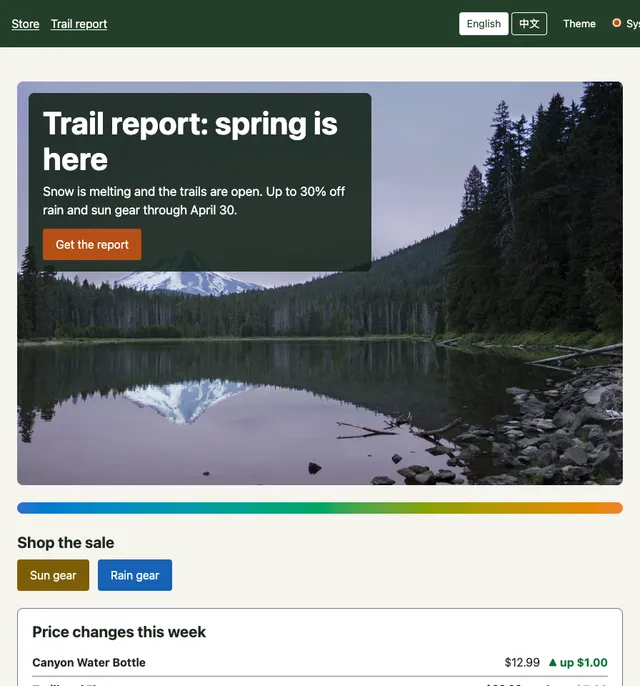
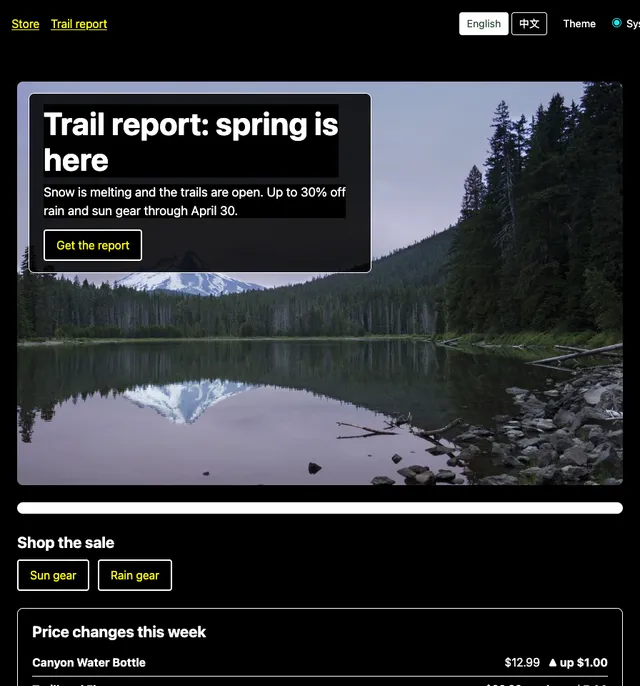
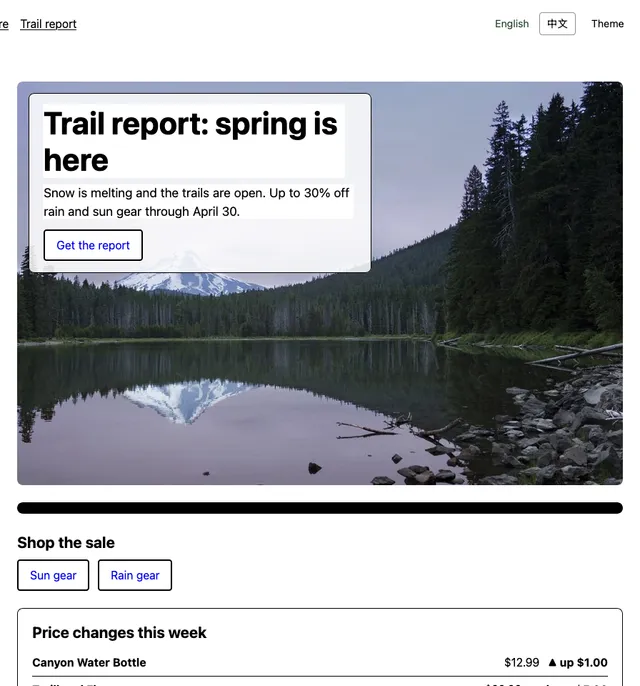
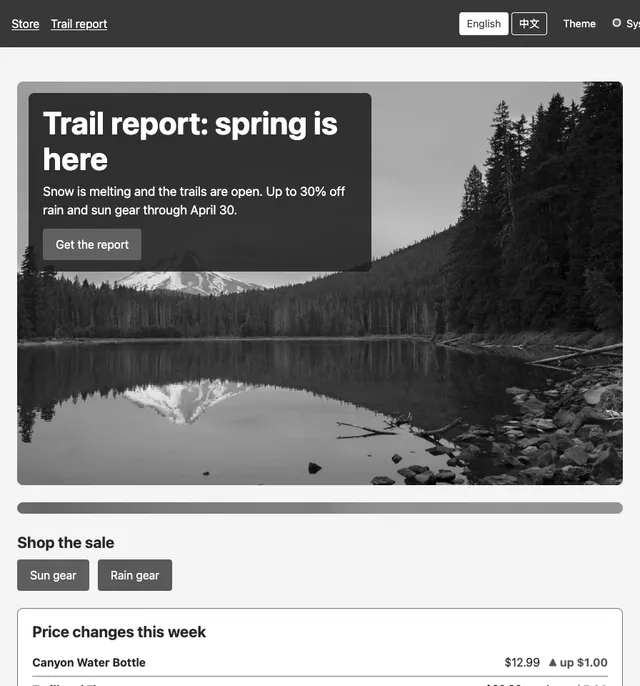
filter: grayscale(1) on the root, as the system grayscale setting would show it (Chrome 156).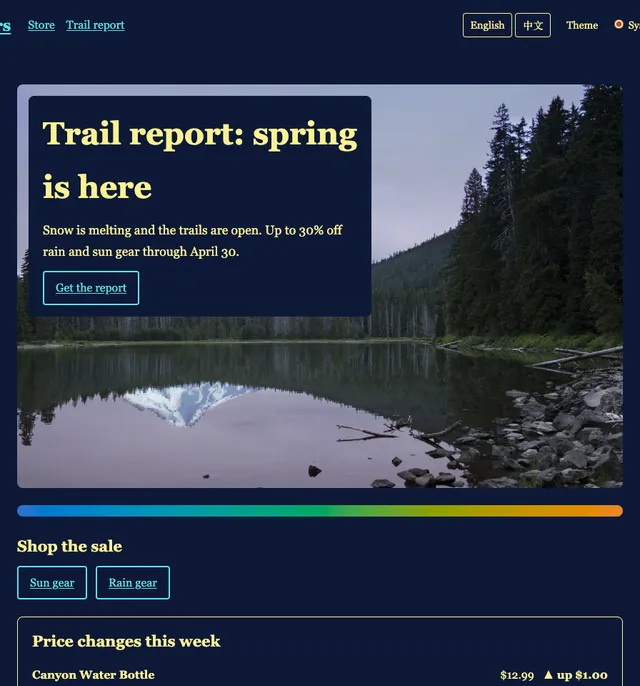
Every view keeps its meaning, and for the same reasons. The headline is readable in all five: it sits on its band as designed, in grayscale and under the user style sheet, and on the browser's backplate under forced colors and the override. Up and down are words and arrows, so they survive grayscale and every palette. The links are underlined, so they stay links when their color is someone else's. The buttons have borders, invisible in the design, that appear when they are needed. The gradient bar loses its colors in three views and nothing is lost, because it was decoration.
The discolored copy shows the opposite: its custom checkboxes vanish under forced colors, its errors exist only as a border color, and its links are found only by a green that a user style sheet replaces with the color of everything else. The lesson of this whole section, from tokens to gamuts to contrast, ends here. Design the colors carefully, and build the page so that it does not need them.
13. Further reading
- The criteria: WCAG 2.2 Understanding documents for 1.4.3 Contrast (Minimum), 1.4.6 Contrast (Enhanced), 1.4.11 Non-text Contrast, 1.4.1 Use of Color and 2.4.13 Focus Appearance; Color contrast on MDN.
- What comes next: the WCAG 3.0 Working Draft (10 September 2026); WCAG3 Contrast as of April 2026, Adrian Roselli; The Easy Intro to the APCA Contrast Method, Andrew Somers.
- Checking: Contrast and Color Accessibility and the Contrast Checker, WebAIM; WhoCanUse, which shows which kinds of vision a pair works for; Make your website more readable, Chrome DevTools.
- Color vision: Color Blindness, National Eye Institute; About Colour Blindness, Colour Blind Awareness; Machado, Oliveira and Fernandes, A Physiologically-based Model for Simulation of Color Vision Deficiency, 2009; simulators in Chrome DevTools, Firefox and Sim Daltonism.
- Forced colors: Windows High Contrast Mode, Forced Colors Mode and CSS Custom Properties, Eric Bailey, 2022; Quick Tips for High Contrast Mode, Sarah Higley; WHCM and System Colors, Adrian Roselli; Styling for Windows high contrast with new standards for forced colors, Microsoft Edge team, 2020; CSS Color Adjustment Module Level 1.
- MDN reference:
forced-colors,<system-color>,forced-color-adjust,prefers-contrast.
14. Summary
| Concept | Key points |
|---|---|
| Three rules | Enough contrast, never color alone, and the reader's settings win. |
| Contrast, measured | WCAG 2 ratio of relative luminance, 1:1 to 21:1. 1.4.3 AA: 4.5:1 text, 3:1 large text (18pt, or 14pt bold). 1.4.6 AAA: 7:1 and 4.5:1. 1.4.11: 3:1 for what identifies controls, states and graphics. No rounding; logos and inactive controls exempt. |
| Translucency | A translucent color has no ratio of its own; composite it over what is behind it and measure the result. |
| Every pair states its contrast | Compute ratios from the tokens in a test, for pairs of roles, on every run, as this site's theme test does. |
| The formula's limits | Ignores polarity, weight and surroundings; misjudges mid-tones. APCA models them but left the WCAG 3 draft in July 2023; the 10 September 2026 draft's algorithm is "yet to be determined". Meet WCAG 2, use APCA and your eyes as a second opinion. |
| Text over images | Measure against the worst pixel. A solid or near-solid band is the reliable fix; text shadows vanish in forced colors. |
| Never color alone | 1.4.1, level A. Underline links, write errors in words, label chart lines and vary their dash and marker, say "required". |
| Color vision deficiency | About 1 in 12 men, 1 in 200 women; red-green types most common. Separate colors in lightness, add a non-color cue, and simulate in DevTools, knowing simulations are approximations. |
| Low vision and age | 4.5:1 is the minimum for 20/40 vision, typical around age 80. Treat it as a floor; watch muted text. |
| Forced colors | The reader's palette replaces yours; shadows and gradients go. Use real controls, borders and outlines (even transparent), currentColor, small system-color patches, and forced-color-adjust: none only for color as content. |
| Preferences | prefers-contrast (Baseline) strengthens or softens tokens; prefers-reduced-transparency (Chromium only) makes glass solid. Neither replaces the minimum. |
| Focus | 2.4.7 visible, 2.4.11 not obscured, 2.4.13 (AAA) a 2px perimeter at 3:1. A two-tone ring, outline first, works on any background and in forced colors. |
| Measuring | matchMedia() with change listeners. Each preference is a fingerprinting bit: count in aggregate, never as profiles. |
| Your colors, not ours | Forced colors, overrides, grayscale and user style sheets replace the palette. A page built from structure keeps its meaning. |