
A short history of type showed how each technology changed the letters. This page names their parts. It goes from the largest unit to the smallest and back: families and fonts, then characters and the glyphs that draw them, the lines every letter sits on, the parts of a single letter, and the em square that every measurement in a font is made in. The second half sorts typefaces into the classes designers use, and connects those classes to the generic families at the end of every CSS font stack. The diagrams are drawn from the outlines of real fonts, and an explorer lets you measure the same lines in the browser.
1. Why the words matter
A developer can ship a page without knowing what a counter or an aperture is, the same way someone can drive without knowing what a differential does. The cost shows up in conversation. A designer's specification says "Literata 18/28, tracking −1%, tabular figures in tables, no faux bold." A developer who reads that as noise either asks a lot of questions or quietly ships something else. A developer who can read it sees four CSS declarations: font-size and line-height, letter-spacing, font-variant-numeric, and font-synthesis.
The vocabulary also explains behavior that otherwise looks like a bug. Why does text at font-size: 16px look bigger in one font than another? Why does a line of text take more vertical space than its letters? Why does the browser draw a bold that the designer calls "fake"? Why does a string of five characters have four letters on screen? Each answer is a term on this page.
Most of the terms are centuries old, from punchcutters and compositors who handled metal type. A few, such as glyph and units per em, come from digital type. CSS adds its own names on top, not always the same ones. Where the three disagree, this page says so.
2. Typeface, font, family, style and weight
These five words are used loosely in everyday speech, and the looseness causes real confusion when ordering, licensing or loading fonts. The traditional meanings are:
- Typeface
- The design: the shapes of the letters as a type designer drew them. Garamond, Helvetica and Literata are typefaces. A typeface is what you choose; it is the "what it looks like" answer.
- Font
- One concrete instance of a typeface. In metal type, a font was a set of sorts in one size and style: 12-point Garamond italic. In digital type, a font is a file, such as
Literata-Italic.woff2. A font is what you load, license and pay for. - Family
- The set of fonts that share a typeface name: regular, italic, bold, bold italic, and perhaps light, medium, black and condensed versions of each. Some families run to dozens of fonts.
- Style
- A variation within a family. Type designers use it broadly for any member of the family ("the semibold condensed style"); CSS uses it narrowly for upright, italic and oblique.
- Weight
- How heavy the strokes are, from hairline thin to black. Regular and bold are two weights; a large family may have nine or more.
"Font" has largely won in everyday speech, so "what font is that?" usually means "what typeface?" That is fine in conversation. It matters when the distinction has consequences: a license is granted for fonts, often per file or per style, and a page loads fonts, not typefaces. Telling a designer "we have the typeface" when the project has only the regular and bold fonts is how pages end up with a browser-made italic.
What CSS calls them
CSS maps the vocabulary onto a few properties. font-family names the family; the browser then picks a font, called a face in the CSS specification, from that family by matching three more properties:
| Term | CSS property | Values |
|---|---|---|
| Family | font-family | A list of family names, ending in a generic family such as serif |
| Weight | font-weight | 1 to 1000; the common names map to hundreds: 100 Thin, 200 Extra Light, 300 Light, 400 Regular, 500 Medium, 600 Semibold, 700 Bold, 800 Extra Bold, 900 Black |
| Style (slope) | font-style | normal, italic, oblique, optionally with an angle |
| Width | font-stretch (renamed font-width in CSS Fonts 4; Safari and Firefox support the new name, Chrome does not yet) | Percentages, or keywords from ultra-condensed to ultra-expanded |
| Size | font-size | Any length; its meaning is the subject of section 6 |
Two words deserve a closer look. An italic is a separately drawn design, historically descended from handwriting: in many serif italics the a loses its upper storey and the f grows a tail below the baseline. An oblique is the upright design slanted, which is what most sans-serif families provide and what a browser fakes when no italic face exists. Designers notice the difference at once. And "bold" in CSS is just font-weight: 700; if the family has no face near 700, the browser thickens the regular outlines itself. Turning that off, and loading the faces a design actually needs, is part of Fonts in CSS, page 05 of this section.
One more distinction will matter to the HTML-minded: italic and bold are presentation, while emphasis and importance are meaning. The <em> and <strong> elements carry the meaning, and CSS decides how it looks; Text-level semantics covers which element to use when.
3. Characters and glyphs
A character is a unit of text. Unicode gives each one a number, its code point, written U+0066 for the small letter f, and a name, LATIN SMALL LETTER F. A character has no shape; it is what a search engine indexes, what a screen reader speaks and what String.length counts. A glyph is a shape in a font: one drawing, with an outline and an advance width. When the browser draws text, it turns characters into glyphs, and the mapping is not one to one.
The first step is a lookup in the font's cmap table, which maps each code point the font supports to a glyph. Web fonts and performance showed it at the head of the tables a browser reads to draw a word. If the font has no glyph for a character, the browser tries the next family in the stack, then fonts on the system; what that means for readers of other scripts is covered in Why type matters. The next steps, in the GSUB table, replace glyphs with other glyphs, and that is where characters and glyphs part ways.
The cases, from most to least familiar:
- Several characters, one glyph. A ligature joins letters that would collide or look awkward side by side. In many serif fonts, f followed by i becomes a single "fi" glyph in which the f's hook replaces the i's dot. A Devanagari conjunct does the same at the level of the writing system: the three characters क, ् and ष (
U+0915 U+094D U+0937) are drawn as the one shape क्ष. An emoji such as a family of three is several code points joined by an invisible zero-width joiner, drawn as one picture. - One character, several glyphs. Arabic letters join, and each has different shapes at the start, middle and end of a word and standing alone; the font picks the right one from context. Many Latin fonts carry contextual alternates too, such as a script face that varies its letters so repeated ones do not look stamped, or Inter, which turns
->into an arrow. - One character, one glyph made of parts. The letter é can be one character (
U+00E9) or two, an e and a combining acute accent (U+0065 U+0301). A good font draws both the same, placing the accent with itsGPOStable.
The work of choosing glyphs, applying ligatures and contextual forms, and positioning marks is called shaping. Browsers hand it to a shaping engine (HarfBuzz in Chrome and Firefox, Core Text in Safari) that reads the font's tables. It is invisible for English and essential for Arabic, Hebrew, Devanagari and many other scripts, which is one reason lang on the page and fonts that cover the language matter so much; the lang attribute even decides which glyphs Chinese and Japanese text gets. For developers the lessons are practical. Search, sort and compare text as normalized characters, not as what is on screen. Subset fonts by the characters a page uses but keep the features that shape them. And never assume one character is one box of a fixed width. Controlling ligatures and alternates from CSS belongs to The details, page 09.
4. The lines letters sit on
Every Latin font is drawn against a handful of horizontal lines. They are not in the outlines as lines, but every letter respects them, and several are recorded in the font's metadata, where CSS and the browser read them.
- Baseline
- The line letters sit on. It is the zero of the font's vertical coordinates, and the line CSS aligns by default when fonts or sizes mix on one line:
vertical-align: baselineis the initial value for a reason. - x-height
- The height of lowercase letters with no ascender, measured on the flat top of the x. It decides how large a font looks far more than its nominal size does, because most of the letters in running text live between the baseline and the x-height.
- Cap height
- The height of flat capitals, measured on H or E. Usually a little lower than the ascenders.
- Ascender
- The part of b, d, f, h, k and l that rises above the x-height, and by extension the line its top reaches. Ascenders often rise above the cap height so that capitals do not shout in running text.
- Descender
- The part of g, j, p, q and y that falls below the baseline, and the line its bottom reaches.
- Overshoot
- Round and pointed letters extend slightly past the lines, below the baseline and above the x-height or cap height. An o drawn exactly as tall as an x looks smaller, because a curve touches a line at one point and a flat stroke along its whole length. Overshoot is an optical correction, typically a percent or two of the em.
The proportions between these lines are a large part of a typeface's character. A large x-height reads well at small sizes and on screens, which is why typefaces designed for interfaces tend to have one; the deck's advice for dashboards and data visualization, to prefer a typeface with a large x-height, follows from it. A small x-height with long ascenders and descenders looks elegant and bookish and needs a larger size, and more line spacing, to read comfortably. Neither is better in general; they suit different jobs, a choice Choosing and pairing takes up.
5. The parts of a letter
Inside the lines, letters are built from strokes, and the strokes and the spaces between them have names. The terms below are the ones that come up in practice: in type specimens, in design feedback, and in the descriptions of fonts in a catalog.
Strokes
- Stroke
- Any line of a letter, straight or curved. Many terms describe how strokes vary.
- Stem
- A main vertical (or nearly vertical) stroke: both sides of an n, the upright of a d or a b.
- Bowl
- A curved stroke that encloses a space: in b, d, p, q, the lower part of a, and the upper part of a double-storey g.
- Shoulder
- The curved stroke that leaves the stem in h, m and n.
- Spine
- The central curve of an S or s.
- Ear
- The small stroke that projects from the top right of a g, and in some typefaces from an r.
- Link and loop
- In a double-storey g, the link joins the upper bowl to the lower loop. A double-storey a has a bowl under an arch. Single-storey forms, common in geometric sans-serifs, italics and handwriting, are a quick way to tell typefaces apart.
- Terminal
- The end of a stroke that has no serif. Terminals can be ball-shaped (the top of Literata's a), teardrop-shaped, tapered, or cut flat, and the angle of a sans-serif's cut is one of the things that separate its classes (section 8).
- Serif
- The small finishing stroke at the end of a stem. A bracketed serif joins the stem with a curve; an unbracketed one meets it at a sharp angle, as in the hairline serifs of Bodoni or the slabs of Rockwell. A typeface without them is sans-serif, "without serifs".
Spaces
- Counter
- The space inside a letter. A closed counter is fully enclosed, as in o, b and the eye of an e; an open counter is partly enclosed, as in c, n and u. Counters that are too small fill in at small sizes and in bold weights.
- Aperture
- The opening of a partly closed counter: the gap in c, e, a and s. Wide apertures keep letters distinct at small sizes and on poor screens; narrow ones make c, e and o look alike. Typefaces designed for legibility, Atkinson Hyperlegible among them, open their apertures deliberately.
Contrast and stress
A broad-nibbed pen held at a fixed angle makes thick strokes in one direction and thin ones in the other. Type kept the memory. Contrast is the difference between the thickest and thinnest parts of the strokes: low in most sans-serifs and slab serifs, moderate in book faces such as Literata at text size, extreme in Didone faces such as Bodoni and Didot. Stress, or the stress axis, is the line through the thinnest parts of a round letter. In faces that follow the pen, it leans to the left, as the pen did. In faces drawn later with pointed pens and engraving tools it stands upright. The o in the diagram is close to upright.
Contrast has a practical side for screens. Hairlines that look refined at 72 pixels can fall below a pixel at 14 and break up, which is why typefaces with an optical size axis, Literata and Inter among them, draw lower contrast and wider spacing at small sizes. Variable fonts, page 08, shows the axis at work.
Try the parts on real letters
The explorer below sets a word in one of this section's free fonts and draws its guide lines from the font's measurements, taken in your browser. Each term highlights its line or the letters that show its part.
6. The em square, and why font-size is not the height of a letter
In metal type, every letter was cast on a rectangular block of metal, the body, and the size of a font was the height of the body, not of any letter on it. The letters had to fit on the body with room for ascenders, descenders and accents, so even the tallest letter was shorter than the size. Digital fonts kept the idea as an imaginary square, the em square, inside which the designer draws. Its side is divided into units per em: 1000, a convention from PostScript, as in Literata, or 2048 in many TrueType fonts, such as Inter. Every coordinate in the font, every width and height on this page's diagrams, is a number of those units.
CSS font-size sets the size of the em. At font-size: 20px, one em is 20 pixels and one unit of Literata is 0.02 pixels. How tall the letters are within the em is the designer's choice, so two fonts at the same font-size can differ a lot in apparent size:
This is why swapping one font for another at the same font-size can make a page look suddenly larger or smaller, and why "use 16 pixels for body text" is a starting point that depends on the typeface. A font with a small x-height may need 18 or 20 pixels to read like another at 16. It is also why the dashed boxes in the diagram are taller than the em. The font declares an ascent and a descent in its hhea and OS/2 tables, and with line-height: normal the browser makes each line at least that tall; Literata's comes to nearly one and a half ems. Those declared metrics are also what shifts the layout when a web font replaces its fallback, which Web fonts and performance measures and fixes.
CSS units that measure the font
CSS has a family of units that measure the current font rather than the em, and they are the bridge between the designer's lines and the stylesheet. Values and units introduces the unit system; these are the type-specific ones:
| Unit | Equals | Support |
|---|---|---|
em | The font-size of the element (for font-size itself, of the parent) | Everywhere |
ex | The x-height of the first available font, read from its metrics | Everywhere |
cap | The cap height of the first available font | Chrome and Edge 118, Firefox 97, Safari 17.2 |
ch | The advance width of the digit zero, roughly one character in monospace | Everywhere |
ic | The advance width of 水, the CJK ideograph for water: one full-width character | Chrome and Edge 106, Firefox 97, Safari 15.4 |
The second rule shows font-size-adjust, which works in all major browsers since Chrome 127 in 2024. It tells the browser to scale whatever font it ends up using so that the x-height is a fixed fraction of the font-size, which keeps a fallback from looking smaller or larger than the font it stands in for. Its uses, and its relationship to readable sizes and line height, belong to Size, spacing and measure, page 06.
7. Width and spacing
In a proportional font, each glyph is as wide as its shape needs: an i is narrow, an m wide. Nearly all text fonts are proportional. In a monospaced font, every glyph has the same advance width, a legacy of typewriters and character terminals that remains useful wherever columns of characters must line up: code, terminal output and tabular data. The cost is that narrow letters get stretched and wide ones squeezed, which is why monospace tends to read less comfortably in long text.
Digits are a special case. Many proportional fonts offer tabular figures, digits that all share one width so numbers line up in tables and do not jiggle as a counter changes, alongside proportional figures for running text. Some also offer old-style figures, which sit and descend like lowercase letters, as Georgia's do, against the lining figures that stand at cap height. Choosing among them in CSS is one of the details of page 09.
Three spacing terms are old enough to have come from metal:
- Leading
- The space between lines, named for the strips of lead compositors put between rows of type. Designers often give size and leading together, "11/15" for 11-point type on 15-point lines. CSS calls it
line-heightand measures it baseline to baseline, distributing the extra space half above and half below each line. - Tracking
- Uniform spacing added to or removed from a whole run of text. Capitals and small text usually want a little more; large display type often wants a little less. CSS calls it
letter-spacing. - Kerning
- Adjustment of the space between particular pairs, such as AV, To or "y.", whose shapes leave a visual hole. The pairs and amounts come with the font, in its
GPOStable; CSS turns them on or off withfont-kerning, and browsers apply them by default.
The CSS for all three, and how they interact with size and the length of a line, is the subject of Size, spacing and measure, page 06.
8. Classifying typefaces
There are many thousands of typefaces, and designers sort them into classes by shared features: serifs or not, how much contrast, which way the stress leans, how the terminals end. The classes are useful shorthand, "we want a humanist sans" says a great deal in three words, and they map loosely onto the history in A short history of type, because each class was the new style of its day. The specimens below set the classic test word "Hamburgefonstiv", which contains most of the shapes that distinguish typefaces, in fonts installed on a Mac.
Serif classes
| Class | Look for | Examples |
|---|---|---|
| Old-style (humanist, Garalde) | Low to moderate contrast; stress tilted to the left, following the pen; bracketed serifs; an organic, calligraphic feel. Readable on rough book paper. | Garamond, Bembo, Caslon, Palatino |
| Transitional | Between old-style and Didone: more contrast, stress closer to vertical, sharper serifs. Hard to define because it is a bridge. | Baskerville, Times New Roman (often filed here), Georgia |
| Didone (modern) | Extreme contrast between thick stems and hairlines; vertical stress; thin, flat, barely bracketed serifs. | Bodoni, Didot, Walbaum |
| Slab serif | Heavy serifs about as thick as the stems; low contrast. Born for posters; ranges from geometric to softer, bracketed forms. | Clarendon, Rockwell, Courier, Bitter |
 Hoefler Text (old-style)
 Big Caslon (old-style)
 Palatino (old-style)
 Baskerville (transitional)
 Times New Roman (transitional)
 Didot (Didone)
 Bodoni 72 (Didone)
 Superclarendon (slab, bracketed)
 Rockwell (slab, geometric)
Sans-serif classes
Sans-serif faces lack serifs by definition, so the classes turn on proportions, the shape of the round letters and the angle at which curves end.
| Class | Look for | Examples |
|---|---|---|
| Grotesque | The nineteenth-century originals, influenced by Didone serifs: solid, often irregular, with some stroke contrast and widths that vary by letter. Suited to headlines and advertising. | Akzidenz-Grotesk, Franklin Gothic, News Gothic |
| Neo-grotesque | The grotesque made uniform and systematic: little contrast, closed apertures, curves on c and s that end horizontally, large families of weights and widths. | Helvetica, Univers, Arial; Inter is close kin |
| Geometric | Built from circles, squares and triangles: a near-circular O, sharp-pointed N and M, and often a single-storey a. | Futura, Avenir, ITC Avant Garde |
| Humanist | Proportions from roman capitals and the pen: some stroke modulation, open apertures, a double-storey a and g in many, and true italics. | Johnston, Gill Sans, Optima, Verdana, Atkinson Hyperlegible |
 Helvetica (neo-grotesque)
 Arial (neo-grotesque)
 Futura (geometric)
 Avenir Next (geometric)
 Gill Sans (humanist)
 Optima (humanist)
 Verdana (humanist)
Monospace, script, display and blackletter
Four more classes cover most of what remains:
- Monospace, described in section 7. It can be serif (Courier New, a typewriter slab) or sans (Menlo, a code font). Recursive has an axis that moves from proportional to monospaced.
- Script faces imitate handwriting. Formal scripts such as Snell Roundhand and Zapfino suggest invitations, heritage and luxury; casual ones such as Brush Script and Caveat suggest a person and a moment. Script is hard to read in quantity, so it tends to serve a few words at a large size.
- Display or decorative faces exaggerate something, roundness, narrowness, weight or texture, for headlines and signs. They range from playful (Bungee) to sinister, and from the effective to the overused (Papyrus, Impact). Most are designed only for large sizes.
- Blackletter, the dense, angular script of medieval Europe, was the first style of printing type: Gutenberg's Bible is set in a blackletter called textura. It stayed in everyday German use as Fraktur well into the twentieth century and now mostly signals tradition (newspaper mastheads) or menace (metal bands). No blackletter is installed with macOS, so it has no specimen here.
 Courier New (monospace)
 Menlo (monospace)
 Snell Roundhand (script)
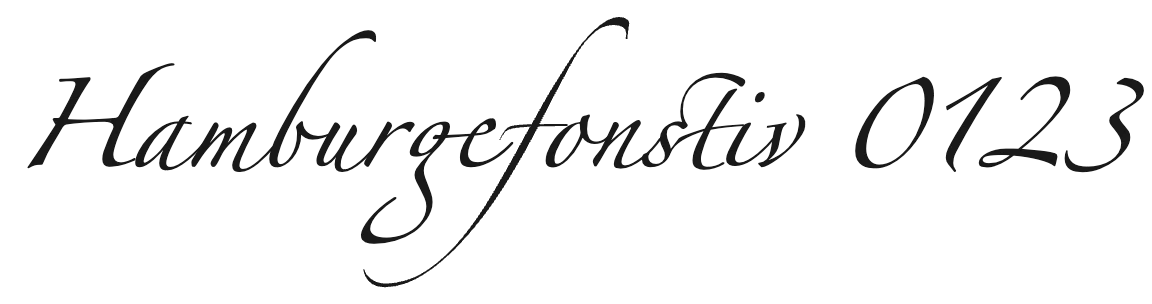 Zapfino (script)
 Brush Script MT (script)
 Copperplate (display)
 Impact (display)
 Papyrus (display)
The limits of classification
The most influential scheme was proposed by the French typographer Maximilien Vox in 1954. The Association Typographique Internationale (ATypI) adopted it in 1962 as the Vox-ATypI classification, and the British Standards Institution adopted a version in 1967 as BS 2961, which split the sans-serifs into the four classes above. It had nine classes in three groups: classical (humanist or Venetian, Garalde, transitional), modern (Didone, mechanistic or slab, lineal or sans-serif) and calligraphic (glyphic, script, graphic), with blackletter and others added later.
In April 2021, ATypI announced that its board had voted to "de-adopt" the system, on the grounds that it was limited to Western printing of the mid-twentieth century and did not represent the work of a membership that designs for the world's scripts. A working group was set up to study a replacement. The episode is a fair summary of classification's limits:
- It covers the Latin alphabet. Arabic, Devanagari, Chinese and Japanese type have their own traditions and terms, such as Naskh and Kufi, or Ming and Gothic, which a Latin scheme cannot hold.
- The classes blur. Times New Roman is filed as transitional or old-style depending on the source; Optima is a humanist sans or a "glyphic" face; Literata, drawn for reading on screens, borrows from several classes at once.
- Newer typefaces mix on purpose. Recursive is sans and mono and casual; Fraunces is an old-style face with soft, "wonky" display features. Variable fonts can slide one face across classes.
Use the classes the way biologists once used "fish": as a convenient word that captures real resemblances, not as a law of nature. They are best at describing tone, which Why type matters showed is much of what a typeface does.
9. Classes in CSS: the generic families
CSS has its own small classification, the generic font families. Every font stack should end in one, because it is the only name guaranteed to mean something on every device. When no named family in the list is available, the browser uses its own choice for the generic:
| Generic | Meaning | Chrome on macOS used |
|---|---|---|
serif | Faces with serifs or flared ends | Times |
sans-serif | Faces with plain stroke endings | Helvetica |
monospace | Every glyph the same width | Courier |
cursive | Joined or handwritten forms beyond an italic | Apple Chancery |
fantasy | Decorative faces | Papyrus |
system-ui | The operating system's interface font | San Francisco |
ui-serif, ui-sans-serif, ui-monospace, ui-rounded | The system's interface font in each style | Not supported; the next family in the list is used |
math | A font for mathematical notation | STIX Two Math |
CSS also defines emoji and fangsong, a Chinese style between Song and Kai. Two caveats follow from the table. First, generics are the browser's choice, and often the reader's: another browser, system or settings page produces different faces, and a reader can set the defaults to anything. The generic tells the browser what kind of face to look for, not which one. Second, the ui-* generics are Safari's (since 13.1); Chrome and Firefox treat them as unknown family names and move on, so a stack must not end with one.
Read with this page's vocabulary, the stack says: the system's own monospace if the browser knows it, then three specific monospaced fonts common on macOS, Windows and Linux, then any monospace at all. Building stacks like this, and the fonts each system ships, is part of Fonts in CSS, page 05.
10. Words for difference
Designers also have words for how text is made to differ from other text, which is how a page shows its structure. Size, weight, case, spacing and grey value rank text, making it more or less important; color, typeface and italic mark it as different in kind without ranking it. Choosing and pairing sets out that distinction, hierarchy against quality, with the CSS for each, and Why type matters shows the tone that weight, width and slope carry. With this page's vocabulary, the advice that follows from both is easy to state: a strong hierarchy uses few of these dimensions, consistently, and saves a change of typeface for text that really is different.
11. Summary
| Concept | Key points |
|---|---|
| Typeface, font, family | The typeface is the design; a font is one file or style of it; a family is the set. You choose typefaces and load and license fonts. CSS: font-family picks the family, and font-weight, font-style and font-stretch pick the face. |
| Italic and oblique | Italic is a separate drawing; oblique is the upright slanted. Without a matching face, the browser fakes bold and oblique. |
| Characters and glyphs | Characters are Unicode code points; glyphs are shapes. cmap maps one to the other; shaping then substitutes and positions glyphs. Ligatures and conjuncts make several characters one glyph; Arabic joining makes one character several glyphs. Strings count characters. |
| Vertical metrics | Baseline, x-height, cap height, ascender, descender. Round letters overshoot the lines. The x-height drives apparent size and small-size legibility. |
| Parts | Stem, bowl, shoulder, spine, ear, link and loop, terminal, serif (bracketed or not); closed and open counters, aperture; contrast and stress. Wide apertures and open counters help at small sizes. |
| The em | font-size sets the em square, not any letter. Fonts draw in units per em (1000 or 2048). At the same size, Inter's x-height is 0.54 em and Caveat's 0.36. Ascent and descent set the height of a line-height: normal line. |
| Font units | ex (x-height), cap, ch (zero), ic (水). font-size-adjust keeps x-heights steady across fallbacks. |
| Spacing | Proportional or monospace; tabular, proportional, lining and old-style figures. Leading is line-height, tracking is letter-spacing, kerning comes from the font and font-kerning. |
| Classification | Serif: old-style, transitional, Didone, slab. Sans: grotesque, neo-grotesque, geometric, humanist. Plus monospace, script, display, blackletter. Useful shorthand with blurry edges; ATypI de-adopted Vox-ATypI in 2021 as too narrow. |
| Generic families | serif, sans-serif, monospace, cursive, fantasy, system-ui, math; the browser and reader choose the face. ui-* works only in Safari, so never end a stack with one. |
| Difference | Hierarchy (size, weight, case, spacing, grey value) ranks text; quality (color, typeface, italic) marks it as different. Use few dimensions at once. |