
What an image costs showed that a photograph's raw pixels are far too heavy to send, and that formats differ by a factor of ten or more. This page explains why. It takes the formats in roughly the order they arrived on the web, because each was built to fix what the one before could not do, then puts them side by side: how they handle transparency and animation, how to choose between them, and how to compare them fairly.
1. Lossless and lossy compression
Every web format compresses pixels, and there are only two ways to do it.
Lossless compression finds redundancy and writes it down more compactly, the way a ZIP file does. A row of 200 identical blue pixels can be stored as "blue, 200 times". Decoding gives back exactly the pixels that went in, bit for bit. The savings depend entirely on how repetitive the image is: large for a flat logo, small for a photograph, where neighboring pixels almost never match exactly.
Lossy compression first throws information away, choosing what the eye is least likely to notice: fine texture, small shifts in color, detail in busy areas. What is left is then compressed losslessly. Decoding gives back an approximation of the original. A quality setting controls how much is thrown away, and the savings are dramatic, because a photograph is full of detail nobody can see at normal size.
Each suits different pictures:
- A photograph has detail to spare, and lossy compression spends that spare detail to save bytes. Lossless compression of a photograph is precise and pointless: nobody can see the difference it preserves.
- A logo, chart, screenshot or line drawing has hard edges, flat color and text. Lossy encoders smear exactly those things, and a lossless encoder compresses the flat areas very well anyway.
One more rule follows from the definitions: lossy damage accumulates. Open a JPEG, edit it, save it as JPEG again, and the encoder throws away detail a second time, on top of the first. This is called generation loss. Keep a lossless master (the original photograph, or the SVG a logo was drawn in) and make every web version from it, which is what this site's build script does.
2. GIF: palettes, one-bit transparency, interlacing, animation
The Graphics Interchange Format came from CompuServe in 1987, and its 1989 revision, GIF89a, is the version the web adopted. GIF is lossless, but with a catch that makes it lossy in practice for anything photographic.
A palette of 256 colors
A GIF stores at most 256 colors, in a table called the palette, and each pixel is an 8-bit index into that table. That is fine for a logo with five colors. A photograph has tens of thousands, so the encoder has to pick the 256 that matter most and map every pixel to the nearest one. Smooth gradients become bands, and encoders hide the bands with dithering, scattering pixels of nearby colors so the eye blends them. The color reduction is the lossy step; the compression that follows is lossless.
Palettes and dithering were once a problem for whole pages, not just images: in the era of 256-color displays, designers kept to a 216-color "web-safe" palette. How color works tells that story, and its demo dithers a photograph to those 216 colors.
LZW compression reads along the rows
GIF compresses with LZW (Lempel–Ziv–Welch), which reads the pixels row by row and builds a dictionary of sequences it has already seen. When a sequence repeats, it writes one short code for the whole run. Long runs of one color compress very well. Noise, dithering and photographic detail barely compress at all, because nothing repeats.
That is why the daisy, reduced to 256 dithered colors, is still 215,489 bytes as a GIF, eight times the JPEG. It is also why a GIF of the same picture can differ in size depending on whether its stripes run across or down: LZW only sees the image one row at a time. LZW was patented, and the patent's enforcement in the mid-1990s is the reason PNG exists. The patents expired in 2003 and 2004.
One-bit transparency
GIF89a lets one palette entry be marked transparent. A pixel with that index shows whatever is behind the image; every other pixel is fully opaque. There is nothing in between, which is what "one-bit transparency" means: one yes-or-no per pixel. Section 7 shows what that does to a curved edge.
Interlacing
A normal GIF stores its rows top to bottom, so a slow download paints the image like a window blind. An interlaced GIF stores them in four passes instead: every eighth row, then the rows halfway between, then every fourth, then the remaining odd rows. After the first pass, an eighth of the data, the browser can stretch those rows into a rough preview of the whole image, which sharpens as the other passes arrive. It made sense on 1990s modems.
Animation
A GIF file can hold many images, each with a delay, and an extension added by Netscape tells the browser to loop them. That made GIF the web's animation format for thirty years. It is a poor one: each frame is a 256-color, LZW-compressed picture with almost none of the frame-to-frame prediction that video codecs use. Section 8 puts numbers on it.
3. JPEG: lossy photographs, artifacts, progressive JPEG
JPEG, named for the Joint Photographic Experts Group and standardized in 1992, was designed for photographs, and it is still the format every browser, camera and image tool understands. It stores full 24-bit color, has no transparency and no animation, and is lossy by design. Its encoder works in four steps:
- Convert the colors from red, green and blue into brightness (luma) and two color-difference channels (chroma). The eye is far more sensitive to brightness than to color, so the chroma channels are usually stored at half the resolution in each direction, a quarter of the samples. This is chroma subsampling.
- Cut each channel into 8 by 8 pixel blocks and describe each block as a sum of smooth wave patterns, from flat to finely striped (the discrete cosine transform).
- Round the strength of each pattern, rounding the fine patterns hardest. This quantization is where the information is lost, and the quality setting decides how coarse the rounding is.
- Compress what remains losslessly.
Artifacts
When the rounding is too coarse, the steps show. The damage has names:
- Blocking: the 8 by 8 grid becomes visible, especially in smooth areas such as sky or a blurred background.
- Ringing (or mosquito noise): faint ripples beside sharp edges, because sharp edges need exactly the fine patterns that were rounded away. Text is the worst case.
- Color bleeding: with chroma at half resolution, a thin red line or small colored text smears into its surroundings.

<picture>, so that you see JPEG's own damage. Zoom in on the center: the florets are gone, replaced by soft squares. Photograph: Macro flower wallpaper, Free Nature Stock, CC0.At a sensible quality the same mechanism is invisible, which is the whole point of JPEG. The daisy at the build script's default quality of 75 is 26,669 bytes and looks like the original. Feed JPEG a flat chart with text and it does far worse: chart.jpg at the same quality is 19,673 bytes, three times the lossless palette PNG (6,194 bytes), with ringing around every letter. And because JPEG has no transparency, a logo saved as JPEG has to be flattened onto a background color, usually white, which then shows as a white box on any other background.
Baseline and progressive JPEG
A baseline JPEG stores its blocks in order, top to bottom, so it appears top to bottom as it downloads. A progressive JPEG stores several scans of the whole image: first a coarse version made from each block's broad patterns, then successively finer detail. On a slow connection the reader sees the whole picture almost at once, blurry, and watches it sharpen.
| Baseline, 34,693 bytes | Progressive, 33,646 bytes | |
|---|---|---|
| After 5,399 bytes | 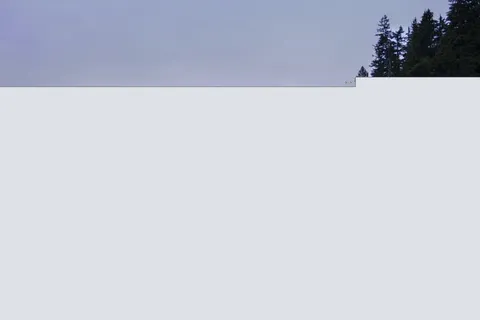 | 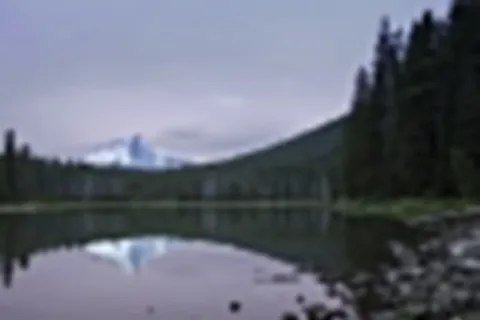 |
| After 10,798 bytes | 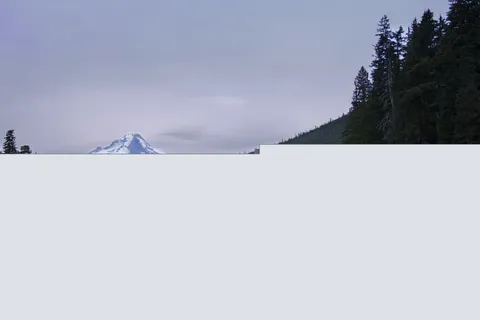 | 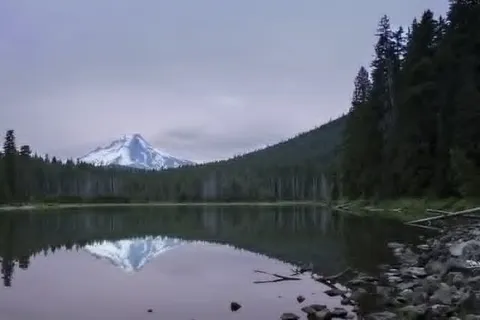 |
| After 18,000 bytes | 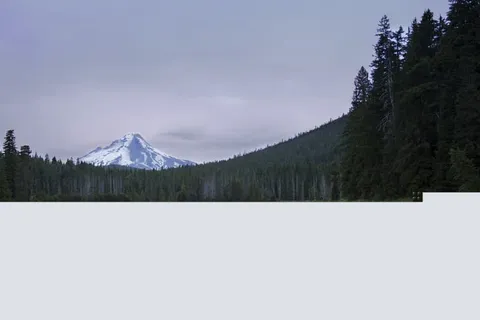 | 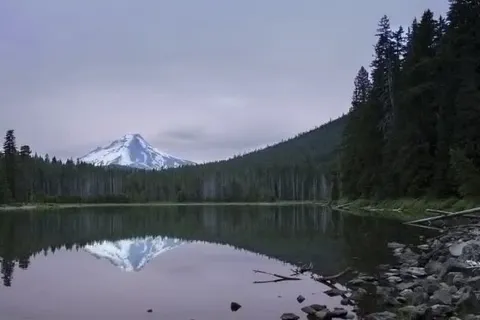 |
| Complete | 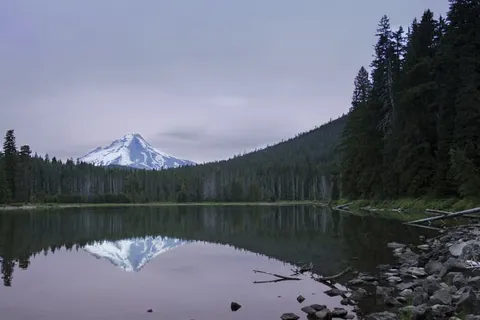 | 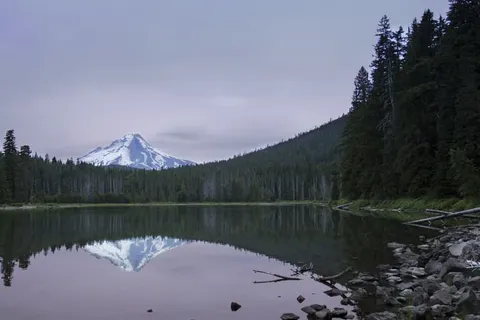 |
Read the table down, one moment of the download per row. After 5,399 bytes, 16 percent of the progressive file, the baseline reader has a strip of sky and the progressive reader already has the whole scene, soft but recognizable: it is time to decide whether to keep reading or scroll on. At 18,000 bytes, a little over half, the progressive version is hard to tell from the finished one, while the baseline version is still missing the lake. The two files hold the same picture at the same quality; only the order of the data differs. (Photograph: Lake Mountain Landscape, Bonnie Moreland, CC0.)

The deck lamented that progressive JPEGs "aren't often used". That has changed quietly, because good encoders now choose progressive for you. mozjpeg, the encoder behind this site's build script and many image tools, writes progressive JPEGs by default. Progressive files are also often a little smaller, since each scan groups similar data together:
| File | Bytes | Kind |
|---|---|---|
daisy-800.jpg | 26,669 | Progressive (mozjpeg's default) |
daisy-800-baseline.jpg | 26,868 | Baseline |
The cost is a little more decoding work for the browser, which redraws the image once per scan. For photographs of any size the trade is usually worth it.
4. PNG: lossless, full alpha transparency, APNG
Portable Network Graphics was designed in 1995 as a patent-free replacement for GIF and became a W3C Recommendation in 1996. It is lossless. Before compressing, it runs each row through a filter that replaces each pixel with its difference from a neighbor (left, above, or a prediction from both), so smooth areas turn into long runs of small numbers. It then compresses with DEFLATE, the algorithm inside ZIP and gzip. The combination beats GIF on GIF's own ground: the chart is 6,194 bytes as a PNG and 12,722 as a GIF.
PNG has several color types, and choosing the right one matters more than any other setting:
- Palette PNG (often called PNG-8): up to 256 colors, like GIF, but with an optional alpha value for each palette entry. A palette PNG can have soft, anti-aliased edges, which no GIF can. This is the right type for logos, icons and charts with few colors; the chart above is one.
- Truecolor (PNG-24): full 24-bit color, for images with many colors that must be exact, such as screenshots.
- Truecolor with alpha (PNG-32): 24-bit color plus an 8-bit alpha channel, so every pixel can be anywhere from fully transparent to fully opaque.
logo.pngis this type, at 9,752 bytes.
What PNG does badly is photographs: it keeps every pixel exactly, and the daisy as a PNG is 710,981 bytes, nearly twenty-seven times the JPEG. A PNG photograph on a web page is almost always an accident, usually a screenshot tool's default or a designer's export.
PNG also has interlacing, called Adam7: seven passes over an 8 by 8 grid, so a rough preview appears after 1/64 of the pixels. It usually makes the file noticeably larger, and it is rarely worth using now.
APNG: animated PNG
Animated PNG adds frames to PNG in a way old decoders ignore: a browser that does not understand APNG shows the first frame as a still image. Mozilla created it in 2004; Chrome added support in 2017 and Edge in 2020, and in June 2025 the PNG Third Edition W3C Recommendation made it part of the PNG standard itself, with the media type image/apng. APNG is Baseline Widely available. It gives animation full color and real alpha transparency, but its frames are still compressed losslessly one at a time, so it is heavy for anything photographic.
5. WebP and AVIF
The two newer formats came from video codecs. A video encoder already knows how to compress a single frame very well, so each format wraps a still frame from a video codec in an image file.
WebP
Google introduced WebP in 2010. Lossy WebP is a frame of the VP8 video codec. It also has a separate, genuinely lossless mode, supports 8-bit alpha in both modes, and supports animation. WebP has been Baseline since September 2020, when Safari 14 added it, and Widely available since March 2023. Baseline is the shared measure of browser support from the WebDX community group: Newly available means every major engine supports a feature, and Widely available means it has been so for 30 months, long enough for older browsers to drop out.
On this site's files, lossy WebP is 38 percent smaller than JPEG for the daisy (16,468 bytes against 26,669), and lossless WebP is 34 percent smaller than PNG for the logo (6,416 against 9,752). Its weakness is that lossy WebP always halves the color resolution, so fine colored detail can blur slightly more than in a good JPEG.
AVIF
AVIF (AV1 Image File Format) stores a frame of the AV1 video codec, from the Alliance for Open Media, in the same HEIF container that iPhones use for photographs. It has everything WebP has, plus higher bit depths (10 and 12 bits per channel), HDR and wide color gamuts. It usually compresses best of all the Baseline formats: the daisy is 11,840 bytes, under half the JPEG.
The deck called AVIF "only partially" supported. That is out of date. AVIF became Baseline Newly available in January 2024, when Edge 121 added it, and Baseline Widely available in July 2026. Its real costs are elsewhere:
- Encoding is slow, many times slower than JPEG at high effort settings. That matters for a site that converts uploads on the fly, and not at all for a build step that runs once.
- No progressive rendering: browsers show an AVIF only when it has fully arrived. On a slow connection a large progressive JPEG can look better sooner than a smaller AVIF.
- Not always smaller: at high quality settings AVIF can lose to WebP, as section 10 shows.
6. JPEG XL, and why a format needs every engine
JPEG XL (ISO/IEC 18181, finished in 2022) is the most capable of the formats here: lossy and lossless modes, alpha, animation, HDR, very large images, and true progressive decoding. It has a feature no other format offers: an existing JPEG can be repacked as JPEG XL about 20 percent smaller with no further loss, and turned back into the identical original JPEG. For a site with millions of old JPEGs, that is a free saving.
Its browser story is the clearest lesson on this page about what a format needs before it becomes a default:
| When | What happened |
|---|---|
| 2021 | Chrome 91 adds JPEG XL behind a flag. |
| February 2023 | Chrome 110 removes it, citing too little interest. The web development community objects loudly. |
| September 2023 | Safari 17 ships it, for still images (no animation, no progressive display). |
| February 2026 | Chrome 145 brings it back behind a flag, using a new memory-safe decoder written in Rust. |
| October 2026 | Chrome 155 (6 October) and Firefox 158 (13 October) turn it on by default. |
So, as this page is written, three of the four browsers that Baseline tracks decode JPEG XL in their current releases. It is still not Baseline: the web-features data behind Baseline does not yet list support in Microsoft Edge, which shares Chrome's engine but makes its own choices about features like this one, and Safari's support is partial. The newest versions are also only weeks old, so most readers' browsers today cannot show a JPEG XL file at all. Check the current status on caniuse or MDN before relying on it.
The general lesson is the one the deck asked about: if one format will never be supported everywhere at the same time, how do you use a better one without breaking the page? The answer is to offer it as an option, never as the only file. The <picture> element (section 9) lets each browser take the best format it can decode and fall back to one every browser can. That is progressive enhancement applied to bytes: the page works everywhere and gets lighter where it can.
7. Transparency and anti-aliasing
A diagonal or curved edge cannot be drawn exactly on a grid of square pixels. Anti-aliasing softens the staircase by giving the pixels along the edge in-between values: a pixel the shape covers by 40 percent gets 40 percent of the shape's color. With transparency, that in-between value is stored as alpha: the edge pixel is 40 percent opaque, and whatever lies behind the image shows through the other 60.
A format with only one-bit transparency, like GIF, cannot store "40 percent opaque". It has two bad options:
- Round each edge pixel to fully opaque or fully transparent. The edge becomes a hard staircase, visible on any background.
- Matte the image: blend the edge pixels with the background color the designer expects (say, white), then make them opaque. On white the edge looks smooth. On any other background, the blended pixels form a pale halo around the shape. Every web developer of the GIF era has seen a logo with a white fringe on a dark page.
An alpha channel solves the problem properly, because the blending happens in the browser against whatever is actually behind the image: a dark theme, a gradient, a photograph. PNG (truecolor with alpha, or palette with per-entry alpha), WebP, AVIF and JPEG XL all have it. JPEG does not have any transparency at all.
Transparency is also a design decision. A chart with a transparent background can become unreadable when the page behind it turns dark. Give data graphics their own background, or draw them as SVG so they follow the page's colors.
8. Animation: why a video usually beats a GIF
A GIF animation is a stack of separate pictures. A video codec does something much cleverer: it stores a full frame now and then, and for the frames between it stores only what changed, predicted from the frames around it. For anything with real motion, the difference is enormous. Here is the same 30-frame, 400 by 226 pan across a lake in four files:
| File | Bytes | Format | Compared with the GIF |
|---|---|---|---|
pan.gif | 1,872,830 | Animated GIF | — |
pan.webp | 213,402 | Animated WebP, lossy | about a ninth |
pan.mp4 | 25,587 | Video, H.264 in MP4 | about 1/73 |
pan.webm | 18,978 | Video, AV1 in WebM | about 1/99 |
The video is also better to look at: full color instead of 256, no dithering. So the advice is old and still right: if you are about to put an animated GIF on a page, use a short, silent video instead.
Each attribute earns its place:
autoplaystarts it, and browsers generally allow autoplay only when the video ismuted.looprepeats it, like a GIF.playsinlinestops iPhones from opening it full screen.- The
<source>elements are tried in order, and thecodecspart oftypelets the browser skip a file it cannot decode without downloading it. AV1 is smallest; H.264 plays everywhere, including Safari on devices without hardware AV1 decoding.
The deck predicted that video would come to <img>, "because people won't stop doing it wrong". Only Safari did that: it plays an MP4 named in <img src> like an animated image. No other engine does, so <video> remains the cross-browser answer.
Motion and the reader
Motion that starts by itself can distract, and for people with vestibular disorders it can cause dizziness or nausea. Operating systems let people ask for less of it, and CSS exposes that request as the prefers-reduced-motion media feature. An animated GIF ignores it and usually cannot be paused at all. A video can have controls, and a few lines of script can hold back autoplay for readers who asked. For images, <picture> can swap the animation for a still frame:
9. Choosing a format: the decision tree, brought up to date
The deck's decision tree ended at GIF, JPEG and PNG, with "or WebP, AVIF, …" written beside it. Brought up to date, the questions are the same and the answers have moved:
The table behind the tree:
| Format | Compression | Colors | Transparency | Animation | Shows early | Baseline |
|---|---|---|---|---|---|---|
| GIF | Lossless (LZW) after palette reduction | 256 per frame | One bit | Yes | Interlaced | Widely available |
| JPEG | Lossy | 24-bit | None | No | Progressive | Widely available |
| PNG | Lossless (filters, DEFLATE) | Palette, 24-bit or more | Full alpha | APNG | Adam7 interlacing | Widely available |
| WebP | Lossy or lossless | 24-bit | Full alpha | Yes | Top to bottom only | Widely available since 2023 |
| AVIF | Lossy or lossless | Up to 12 bits per channel, HDR | Full alpha | Yes | No | Widely available since July 2026 |
| JPEG XL | Lossy or lossless | Up to 32 bits per channel, HDR | Full alpha | Yes | Progressive | Not yet |
Serving the better formats safely
Because no new format arrives everywhere at once, the deck named two ways to offer one. The first is markup. A <picture> element lists the files in order of preference, each with its media type, and the browser takes the first it can decode:
The <img> is not optional: it is the element that actually displays, carries the alt, width and height, and serves browsers that understand none of the sources. Images in HTML teaches <picture> fully, including how it combines with sizes and art direction.
The second way is on the server, with content negotiation. Every image request carries an Accept header listing the formats the browser can decode, such as image/avif,image/webp,*/*/code. A server or image CDN can read it and answer the same URL with the best format, adding Vary: Accept so caches keep the versions apart. Image performance covers it with CDNs and caching.
10. Same bytes, different quality: comparing fairly
Three habits keep a format comparison honest: look at the pictures, compare at equal bytes or equal visual quality, and never trust a quality number across formats.
Spot the difference
The format lab shows the daisy, the logo and the chart in every format, with each file's bytes and a magnifier on a telling region. At normal size most of the versions of each picture are indistinguishable, which is the point: the 710,981-byte PNG of the daisy looks no better than the 16,468-byte WebP. The differences appear only under magnification, in the places each format is weak.
Apples to apples
The deck's most persuasive slide put a 23 KB JPEG beside a 23 KB PNG of the same graphic. The build script makes the same comparison with the chart: it searches for the highest JPEG quality whose file still fits in the palette PNG's bytes. The answer is quality 8.
| File | Bytes | Format |
|---|---|---|
chart.png | 6,194 | Palette PNG, lossless |
chart-same-bytes.jpg | 5,892 | JPEG at quality 8, the best JPEG that fits |
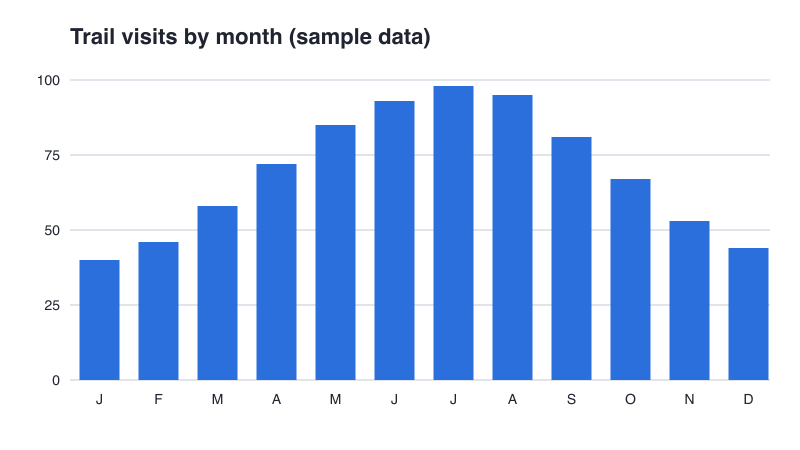
chart.png, 6,194 bytes: every pixel exact.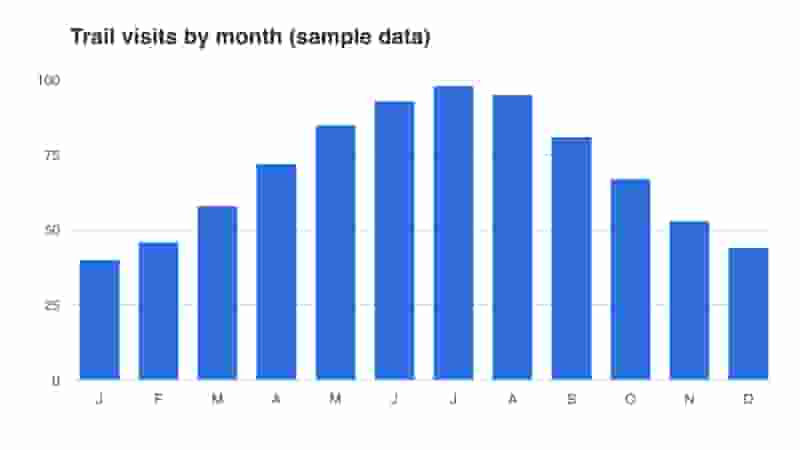
chart-same-bytes.jpg, 5,892 bytes: the same budget spent badly.Bytes are the same, and it is clear which format is better here. A real chart would be better still as SVG, but between these two, the format that matches the picture wins at any budget.
Quality numbers are not comparable
Every encoder has a "quality" setting from 0 to 100, and it is tempting to read "quality 70" as the same thing in every format. It is not. Each encoder maps the number onto its own internal settings, and the scales do not line up. Here is the daisy at five quality settings in three formats:
| Quality | JPEG | WebP | AVIF |
|---|---|---|---|
| 10 | 5,383 | 6,434 | 3,562 |
| 30 | 11,750 | 9,262 | 5,963 |
| 50 | 16,796 | 12,278 | 11,840 |
| 70 | 23,506 | 15,440 | 20,689 |
| 90 | 46,997 | 33,382 | 45,982 |
Read naively, the table says AVIF is worse than WebP at quality 70 and 90. It says no such thing. AVIF's scale is simply different: AVIF at quality 50 looks roughly as good as the others at 75, which is why the build script uses 50 for AVIF and 75 for WebP and JPEG. The fair comparison is at equal visual quality, judged by eye or by a perceptual metric such as SSIMULACRA 2 or Butteraugli, and at that comparison AVIF usually wins. Tools such as Squoosh, which Image performance walks through, put two encodings side by side with a slider for exactly this.
Don't go byte crazy
The opposite mistake is chasing bytes past the point where the picture survives. The daisy at JPEG quality 10 (5,383 bytes, in section 3) is a fifth of the default and visibly damaged: the reader saves about 21 KB and gets a worse page. Two better moves exist. Change the format: AVIF at quality 30 is 5,963 bytes, about the same, and looks far better. Or change the size: an image that is shown smaller can be sent smaller, which Images in HTML and Fluid and responsive images teach. The goal is the smallest file that still does its job, not the smallest file.
11. Summary
| Concept | Key points |
|---|---|
| Lossless and lossy | Lossless gives back every pixel and suits flat graphics. Lossy discards what the eye misses and suits photographs. Lossy damage accumulates, so keep a lossless master. |
| GIF | A 256-color palette, LZW compression along the rows, one-bit transparency, interlacing and animation. Every one of its jobs is now done better by another format. |
| JPEG | Lossy photographs in 8 by 8 blocks. Too low a quality shows blocking, ringing and color bleeding; no transparency. mozjpeg writes progressive JPEGs by default, often slightly smaller. |
| PNG | Lossless, with filters and DEFLATE. Palette PNG for few colors, alpha for soft edges, never for photographs. APNG is now part of the PNG standard. |
| WebP and AVIF | Still frames from video codecs, with alpha and animation. Both are Baseline Widely available: WebP since 2023, AVIF since July 2026. AVIF is usually smallest but slow to encode and not progressive. |
| JPEG XL | Capable, and on by default in Chrome 155 and Firefox 158 since October 2026, with partial Safari support. Not Baseline yet: offer it only with a fallback. |
| Transparency | Alpha blends edges against whatever is behind the image. One-bit transparency gives staircases; matting gives halos on other backgrounds. |
| Animation | A short muted, looping video is about a hundredth of the GIF. Respect prefers-reduced-motion and give the reader a way to pause. |
| Choosing | Moving: video. Shapes: SVG. Photographs: AVIF, WebP, JPEG in <picture>. Anything else: PNG or lossless WebP. Content negotiation with Accept is the server-side alternative. |
| Comparing fairly | Look at the pictures, compare at equal bytes or equal visual quality, and never compare quality numbers across formats. |